Skip to content Skip to navigation menu
rts-banner-desktop rts-banner-mobile

Program Eligibility Alert

We're sorry. This account is not eligible for program name. Please review the program's eligibility details and Terms & Conditions or you can call for further information.

The Distributed Energy Program for Private Generation

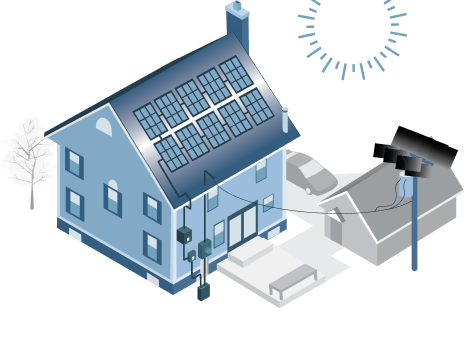
Together, we can create a clean energy future for Michigan. DTE doesn’t install renewable energy or solar panel systems for customers, but we can connect your private generation system to the grid through the Rider 18 Distributed Generation Program.

Eligible participants with private generation systems are still connected to DTE's distribution grid. They receive compensation for electricity they send into DTE's distribution system (called outflow). The compensation offsets the cost of energy they use from the grid (inflow).

To participate, you must fulfill DTE's Renewable Resource requirements. The program is limited to Level 1, 2 and 3 renewable projects.

Ready to go renewable?

Is my roof a good candidate for rooftop solar?

rts-resedential rts-resedential

There may be other factors that could prevent rooftop solar power generation on your property. Contact an installer to evaluate your building for solar compatibility.

Private Energy Generation Basics

DTE’s private energy generation programs can help customers save on their bill and contribute to a cleaner, greener future for Michigan. The Rider 18 Distributed Generation Program lets you connect your renewable energy system — whether that’s solar, wind or something else — to our grid. Once you’re connected, you’ll save every month when your private generation equipment helps deliver clean power to the system.

After you’re familiar with the basics of the distributed energy generation program, visit the Interconnection Process tab to learn more about the practical aspects of getting started with private generation. You can also get more- detailed information about the Rider 18 Distributed Generation Program.

Distributed Generation Impact Calculator

Installing a solar PV system is an important financial and environmental decision. To help our customers, DTE offers a Distributed Generation Impact Calculator that can estimate the financial impacts of installing a solar PV system.

While the Impact Calculator provides a general financial analysis, it's important to understand that the calculator uses assumptions and averages, so the results won't fully reflect the exact load profile or circumstances for each unique customer. The results of the calculations are not a promise or guarantee of a customer's actual financial impact. DTE is not responsible for the results or accuracy of those estimates.

You can sign in to your DTE account to automatically apply your average monthly usage data in the analysis.

123 Place St, Ann Arbor, MI 48103 drop down
EV Meter # drop down

The data will be applied automatically if you sign in to your DTE account, or you can average your last 12 months of usage listed on your monthly billing statements.

System size must be limited to no more than 100% of your electricity consumption from the meter the system is being attached to, and cannot exceed 150 kW of aggregate generation at a single site.

expandOptional details for a more precise estimate

Morning drop down
Pay up front drop down
$

Impacts of Adding Solar Energy to Your Home

[$X,XXX]

Estimated annual electric bill.

About your estimate

[XX] Years

Estimated payback period.

How payback is calculated

[$XX,XXX]

Annual financing costs for [XX] years.

About financing costs

Your potential environmental impact:

trees planted annually.

How was this calculated?

The calculator is designed to be an informational and educational tool only. When used alone, it does not constitute final, quotable results. The results are provided as a rough approximation of your bill.

The calculator uses the following assumptions and averages based on information available for the state of Michigan and the current construct of Rider 18 and is subject to change.

Battery usage is not considered in the results of the bill calculator. Adding a battery would result in a higher average cost of <$x,xxx>, assuming the battery is intended for backup rather than load management use.

Rate: If you sign in to your DTE account, the calculator will pull the rate at the selected location and meter. If you don't sign in, estimates are calculated based on the current Standard D1 Rate.

Solar panel output is used under the assumption that the inverter at the location would allow for the entered output amount.

Results are based on the assumption that customer energy usage is the same as it was before the installation of solar panels.

Average monthly usage is calculated from averaging the last available 12 months of data.

Capacity factor is assumed at 13%.

The calculator factors the annual rate of degradation of solar panels ay 0.5% per year. Source: National Renewable Energy Laboratory (NREL).

Interest rate is assumed as 3.99%.

Average electricity use throughout the day is assumed and may not match your actual usage.

The calculator factors in the Investment Tax Credits (ITC) when calculating costs, payback period and the return on investment.

If install cost is not inputted, the calculator will assume the cost of the solar installation based on current technology costs, ITC's, etc.


How does the program work?

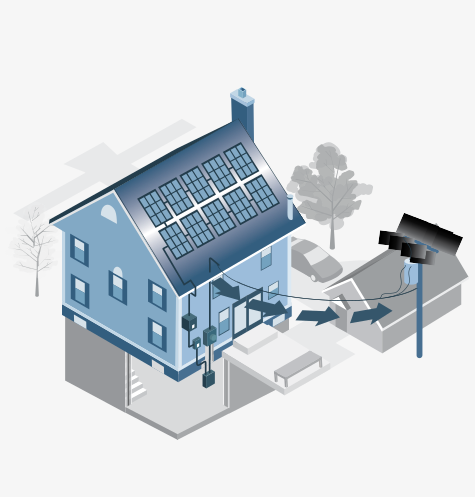
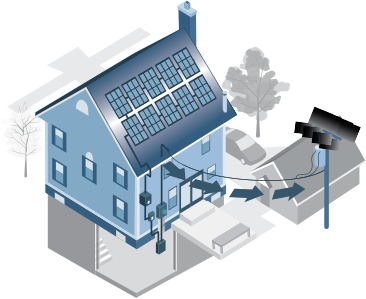
When your private generation system produces more power than you need, the excess energy flows through your DTE service meter and onto the grid for other customers to use. You’ll receive a credit on your bill, called an “outflow credit,” for this extra energy. The credit helps pay for electricity you get from DTE when your system doesn’t produce enough power to meet your needs, like after sunset.

family-desktop family-mobile

What kinds of private generation are compatible?

Most private generation customers have rooftop solar, but other kinds of power generation can be connected to DTE’s grid through the Rider 18 Distributed Generation Program, including wind and hydroelectric. Learn more about the resource requirements in our rate book.

family-desktop family-mobile

How big can my generation system be?

Rider 18 Distributed Generation is compatible with systems up to 550kW. Most home systems are around 7 kW, and most commercial systems are around 49 kW. Your generation system is sized based on the most recent 12-month kWh consumption at your premise. Refer to the supplemental procedures for additional information regarding sizing under the Distributed Generation Program.

family-desktop family-mobile

How will distributed generation affect my bill?

The impact on your electric bill will depend on several factors, including energy consumption, generation and system size. In general, it should reduce your monthly bill by reducing the amount of power you need to get from the grid. Learn more by using our bill calculator and input inflow/outflow data to see how much you might save.

family-desktop family-mobile

Installing and Connecting Your Private Generation System

Installing and Connecting Your Private Generation System

We know that installing a private generation system is a big commitment. While DTE can't design or install your system, we will work with you and your installer throughout the interconnection process.

This page outlines the seven steps you and your installer will follow to work with DTE to safely connect your system to the grid.

If you are not a registered installer with DTE, please see the Installer Job Aid to get set up and to find additional information about the connection portal. Customers can consult the Customer Job Aid.

The timeline for the interconnection process varies based on many factors. You can find more information on the process and timeline in the interconnection procedures.

We look forward to working with you to get your system connected safely to the grid.

1. Find the Right Installer

2. Prepare for Your Project

3. Apply for Interconnection

4. Fast, Non-Export or Study Track

5. Sign Interconnection Agreement

6. Install and Document Your System

7. Pass the Site Visit

1. Find the Right Installer

We encourage you to do research as you would for any major project or purchase.

tasks

Credentials

DTE does not provide installer recommendations, but Michigan Saves maintains a list of solar installers in the state. Meet with multiple contractors and be sure to review credentials. You can look up the current status of licenses for both the general contractor and the electrician who will perform work.

energy

Track Record

In addition to online reviews, ask for recommendations from friends and neighbors who have installed rooftop solar panels. Look for positive reviews at the Better Business Bureau.

protection

Warranties

Ensure that your installation includes a workmanship warranty, so you're covered if issues arise after your system is live. Read the warranty thoroughly before you commit, and be sure you understand what's covered and what isn't.

2. Prepare for Your Project

Adequate preparation ensures your installation goes smoothly. Before you start a project, be sure to:

  • Research your project. You can find documents to help you prepare on the Resources & Support tab.
  • Review the Energy Usage Data in your DTE account to check monthly, seasonal and annual usage. Also review any plans for additional electric use or efficiency improvements. Know the amount of power your system must generate to meet your needs and budget.
  • Assess your home's potential and be aware of common solar panel installation issues.
  • Meet with multiple installers and solar energy companies to understand the project's scope and costs. Get references, review licenses and certifications and make sure you’re confident your installer will keep you informed throughout the interconnection process.

Projects are grouped into five levels. Most residential solar power systems will fall under Level 1 requirements, and most business projects fall under Levels 2 or 3. DTE’s interconnection procedures will define your project level and requirements. Large projects may require a pre-application. Learn more about documents for project preparation.

3. Apply for Interconnection

Once the preparation is complete, you or your installer (if you've agreed to your installer's proposal) will complete DTE's interconnection application in PowerClerk®. You will receive project updates via email, and your installer can access the PowerClerk® website for status updates on the application.

You can check your project’s status in the dashboard once you log in.

Once DTE receives your application and fee, we’ll review your project. Then, we’ll let you know if your application is approved and which track your project will follow or inform you if your application needs to be amended.

Inter-connection-desktop Inter-connection-mobile

4. Fast, Non-Export or Study Track

Once DTE accepts your completed application, we’ll process it under either the Fast Track, the Non-Export Track or the Study Track.

In the fast and non-export tracks, DTE will evaluate the initial review screens and notify you and your installer of the results. If your project doesn't pass the initial review, DTE will notify you about your options.

The study track consists of a System Impact Study and, where required, a Facilities Study. At the end of the system impact study, DTE will provide written results to the applicant and indicate if a facilities study is required. Upon completion of the facilities study, DTE will provide written results to the applicant.

5. Sign Interconnection Agreement

The Interconnection Agreement is a required contractual agreement between a customer and DTE explaining that both parties will operate their respective systems safely. It also contains detailed interconnection requirements and other important information about construction, upgrades and costs.

Before construction can begin, DTE will send the customer an Interconnection Agreement from DocuSign for an electronic signature. If necessary, DTE can mail a hard copy for the customer to sign.

The Interconnection Agreement must be signed by the customer. It cannot be signed by an installer on the customer’s behalf.

Inter-connection-desktop Inter-connection-mobile
Inter-connection-desktop

Before installation begins, make sure your project has a fully executed Interconnection Agreement between you and DTE.

There are project risks for not correcting deficiencies before installation:

Sunk costsNo application refunds.

DelaysProjects can be delayed for weeks or months.

ReapplyingThe application process, including fees and reviews, starts again.

6. Install and Document Your System

Once DTE receives and fully executes your Interconnection Agreement, you or your installer must complete the installation and upload the required construction documents to PowerClerk.

Installers Must Upload:

An approved electrical inspection sticker

The sticker must specify that the final inspection was approved and the work description was for a solar energy system. It must also include the site address and be signed and dated by the local governing authority.

Inter-connection-desktop Inter-connection-mobile

Photos: installed inverters and nameplate capacity

  • Close-up photos of each inverter, showing nameplate capacity.
  • Photos showing all installed equipment in context with the site.
Inter-connection-desktop Inter-connection-mobile

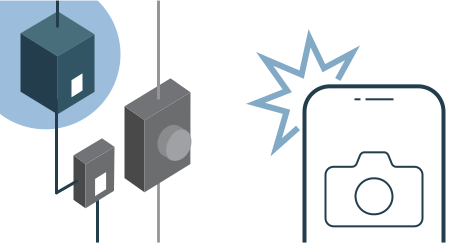
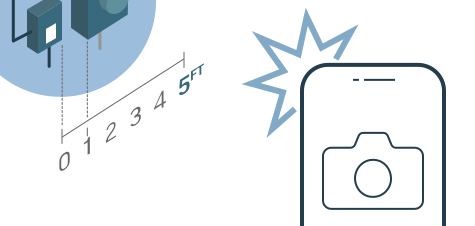
Photo showing the disconnect switch is within five feet of the meter

Photo must include the meter and A/C disconnect.

This is required for safety reasons. It protects you, DTE field technicians and emergency services.

Inter-connection-desktop Inter-connection-mobile

Once all construction documents are uploaded to PowerClerk, DTE will review them for accuracy. If your construction documents are approved, your project will be scheduled for a site visit. If the construction documents are not approved, you or your installer will need to correct them.

DTE may require additional documentation for different types or larger projects.

7. Pass the Site Visit

On the day of the site visit, a DTE field technician will visit your location to test your private generation energy system. To prepare, please ensure:

Utility meter is accessible

Equipment is ready to be tested.

Solar panels are clear from debris (snow, leaves, etc.).

All inverter(s) are on

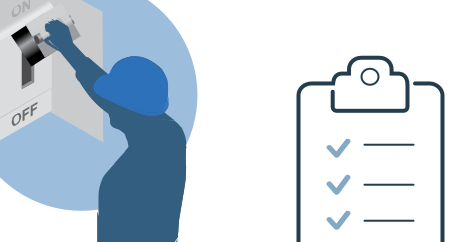
The AC disconnect switch is in the “OFF” position.

Reminder: The AC disconnect should not be switched to “ON” by anyone other than a DTE technician.

You're Connected!

After successful site inspection and testing, a DTE technician will set the disconnect to the “ON” position. DTE will then email you a Parallel Operating Authorization through PowerClerk® for your records.

You can now begin solar power generation. Your DTE bill will reflect charges for your service as well as outflow credits. It may take one or two billing cycles to see your new bill.

See the Resources tab for a more detailed explanation of the interconnection procedures by project level.

Inter-connection-desktop Inter-connection-mobile

Useful Links, Resources and FAQs About Private Generation Systems

Useful Links, Resources and FAQs
About Private Generation Systems

Getting your rooftop solar system connected to the grid isn’t as complicated as it might seem at first. Here, you can find the answers to some of the most common questions about Rider 18 and the interconnection process, as well as links, example documents and other resources — everything you need to go renewable and start earning credits, collected in one place.

Interconnection Fees

Interconnection Fees

Fee to apply for the Rider 18 Distributed Generation Program is $50.* Other projects may incur fees based on the project track. See table below for more information.


                  expandInterconnection Table - Additional Study Cost by Type
When they are determined to be necessary the following additional study fees will be clearly indicated on the System Impact study agreement or Facilities study agreement as part of the total fee to be paid for that study phase.

* The fee for a Legacy Net Metering or Distributed Generation program must not exceed a total of $50, including any applicable Fast Track Initial Review fee, Fast Track Supplemental Review fee and Study Track fees.

† When a System Impact or Facilities Study is necessary for Non-Export or Fast Track projects, the fees will correspond to the appropriate level of the project.

‡ Pre-application review required for all Level 4 and 5 projects.

§ The system impact and facilities study fees for level 3 and 4 may only require the system impact study fee, the applicant will be notified if a facilities study is needed or if that work was completed in the System Impact Study.

For Level 1 and 2 projects, System Impact and Facilities studies are combined.

Interconnection Documents, Samples and Other Resources

Documents for Project Preparation

Level 1 & 2 Example Documentation

Level 3, 4 & 5 Example Documentation

Level 1-5 Example Documentation

Frequently Asked Questions

expandRider 18, Net Metering and MIGreenPower

  • Why are Rider 16 Net Metering customers being switched to the Rider 18 Distributed Generation program?

    State laws mandated that the Michigan Public Service Commission (MPSC) phase out the Net Metering program and create a new distributed generation program. For DTE, these laws resulted in the implementation of the Rider 18 Distributed Generation Program in 2019.

    DTE's existing Rider 16 Net Metering sites will be converted to the Rider 18 Distributed Generation Program upon reaching their 10-year anniversary in the Net Metering program. DTE will notify customers via email approximately 30 days before their rate conversion.

  • When switching to Rider 18 Distributed Generation, will Net Metering customers lose their Excess Generation Bank?

    No. Customers converting to the Rider 18 Distributed Generation Program will receive a check for their Excess Generation Bank balance, if applicable, approximately 60 days after their conversion.

  • How does this affect a SolarCurrents contract?

    Moving to the Rider 18 Distributed Generation Program does not affect SolarCurrents contracts. The SolarCurrents contracts are applied to the purchase of renewable energy credits for 20 years and will continue under the Rider 18 Program.

  • Can a customer expand their existing project size and remain on Rider 16 Net Metering?

    No. If a customer expands their renewable generation system, the entire system will be moved to the Rider 18 Distributed Generation Program, not just the expansion.

  • How will the Distributed Generation Program impact the customer's electric bill?

    The impact on the customer's bill depends on several factors, including energy consumption, generation and system size. Interested customers can download this calculator and input inflow/outflow data to estimate the impact on their bill.

  • Can a Rider 18 Distributed Generation Program customer enroll in the MIGreenPower program?

    Yes, a Rider 18 Distributed Generation Program customer can enroll in the MIGreenPower program as a simple and effective way to become a net zero carbon emissions customer. Under Rider 18, customers inflow electricity from the grid and receive credit for any outflow. As a result, customers in the program may be interested in “greening” all their energy.

    In order to calculate their MIGreenPower subscription, customers need to look at their annual inflow and outflow. For example:

    Achieve Net Zero Emissions kWh Percent%
    Total annual inflow 10,000 100%
    Renewable energy from grid 1,500 15%
    Total annual outflow 7,500 75%
    Net 1,000 10%
    “Greening” all incoming energy kWh Percent%
    Total annual inflow 10,000 100%
    Renewable energy from grid 1,500 15%
    Net 8,500 85%
    Achieve Net Zero
    Emissions
    Total annual
    inflow
    kWh
    10,000
    Percent
    100%
    Achieve Net Zero
    Emissions
    Renewable Energy
    from grid
    kWh
    1,500
    Percent
    15%
    Achieve Net Zero
    Emissions
    Total annual
    outflow
    kWh
    7,500
    Percent
    75%
    Achieve Net Zero
    Emissions
    Net
    kWh
    1,000
    Percent
    10%
    Estimated Net
    Zero Percent for
    MIGP
    10%
    “Greening” all
    incoming energy
    Total annual
    inflow
    kWh
    10,000
    Percent
    100%
    “Greening” all
    incoming energy
    Renewable Energy
    from grid
    kWh
    1,500
    Percent
    15%
    “Greening” all
    incoming energy
    Net
    kWh
    8,500
    Percent
    85%
    Estimated
    Percent for MIGP
    85%

expandWhat to Expect Once Your Solar Energy System is Connected

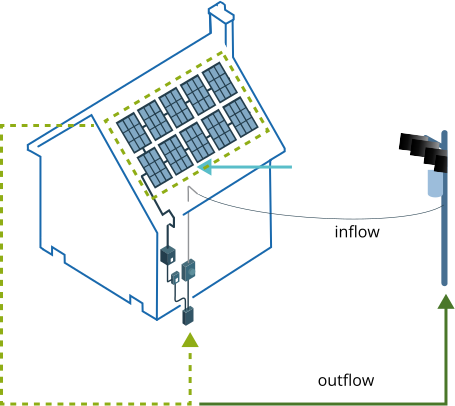
After a successful site visit, DTE will provide formal authorization to turn on your system so it can begin generating energy. At times, you may generate more electricity than you use. Your system will send that extra energy back to DTE, and you’ll receive an outflow credit. Outflow credits on your bill can be used to offset all electric charges except securitization (surcharges approved by the Michigan Public Service Commission to recover certain costs associated with maintaining the electrical system). When your system doesn't generate enough electricity to meet your needs, you'll get the extra energy you need from DTE, called inflow.

flow-desktop

Inflow is the electricity the customer gets from DTE. It is charged at the retail rate shown on the customer’s rate schedule attached to Rider 18.

Outflow is the electricity generated by the customer’s distributed generation project but not used on site. It is sent to the distribution grid and credited based on the rate schedule attached to Rider 18.

If the amount of outflow credit in a billing period exceeds all electric charges, excluding securitization, the extra credits are stored in the excess generation bank. These credits can offset electric charges (excluding securitization) in future billing cycles. The excess generation bank carries forward and does not expire.

It will generally take one or two billing cycles for a customer's bill to reflect participation in the Rider 18 Distributed Generation Program and any outflow credits.

expandLive Systems

  • Will I still receive a bill from DTE after I have installed my system?

    Yes. Customers with private generation systems are still connected to DTE's grid and receive electric energy from DTE when their system does not produce enough power to meet their needs. You'll still receive charges according to your rate schedule for total inflow, including any fixed charges associated with the relevant rate schedule.

  • Will customers who install private generation systems still lose power if DTE's distribution system suffers damage, requires maintenance, or otherwise experiences a power outage?

    If your system is equipped with a typical “grid following inverter:”

    Yes. Inverters are designed to shut off if the utility loses power, which is required by national safety standards. Customers with generation sources not connected to the grid (such as backup generators and/or battery storage) may avoid power loss in such instances.

    If your system includes a “grid-forming” inverter and a transfer trip system (not common in Michigan):

    Your system may keep your devices running, so long as it produces enough power to support your current needs. However, if you try to use more power than your private generation system makes, the inverter will turn off the power until you reduce demand. If you have a solar panel system, it will usually stop making enough power as sunset approaches, even if the sun is still visible.

    In either case, customers are NOT “off the grid” while on the program. Private renewable generation systems taking service under the Rider 18 Distributed Generation Program are still connected to a continuous source of electrical energy from DTE.

  • See what your bill will look like with the Rider 18 Distributed Generation Program

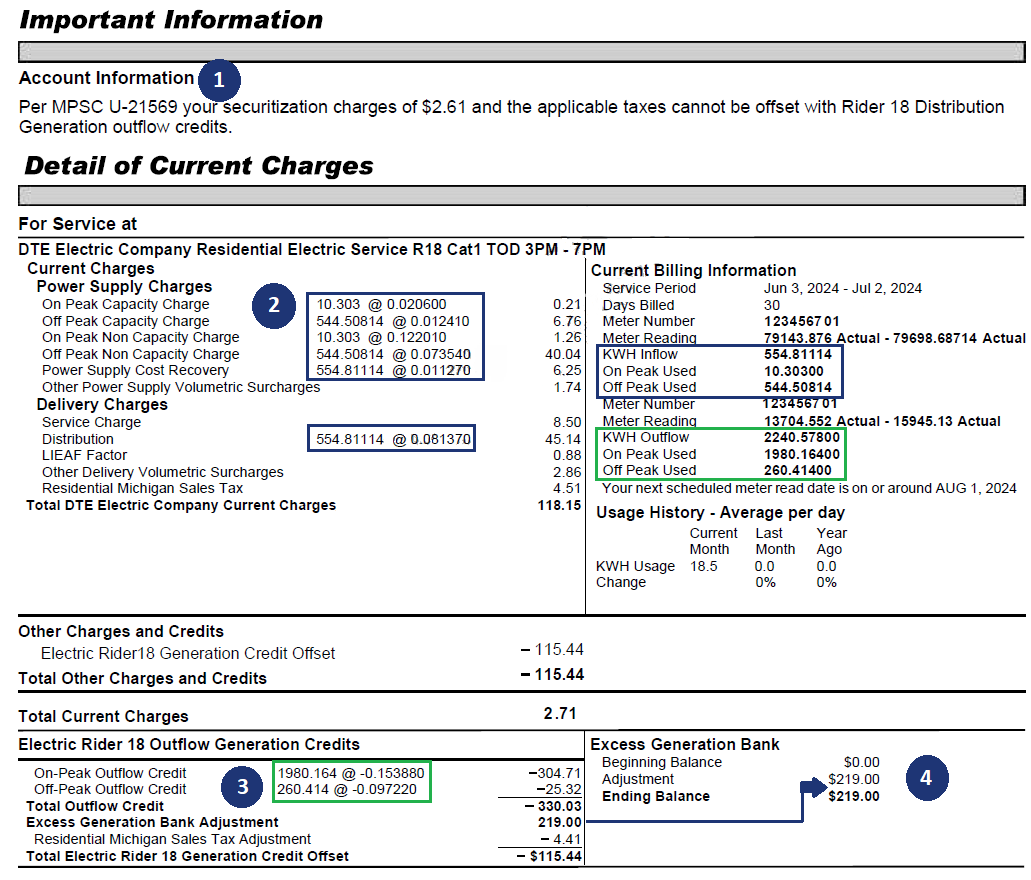
    Below is an example of a bill you'd receive under the Rider 18 Distributed Generation Program. The example is meant for illustrative purposes only. Charges depicted may not reflect current rates. If you have questions, please contact the rates and billing hotline at (800) 482-8720, option #4.

bill-img bill-img
  1. Outflow credits cannot be used to offset securitization charges. Securitization charges are included in the Other Power Supply Volumetric/Delivery Volumetric Surcharges. To avoid confusion, the monthly securitization charge is listed under Important Information. This amount does not include the applicable tax for the securitization charges.
  2. Inflow charges are based on the rate schedule attached to Rider 18.
  3. Credits under Rider 18 are given based on outflow. The credit is based on the power supply component of customer’s retail rate including Power Supply Cost Recovery (PSCR). For more information on PSCR and a list of outflow credits, please see the rate book, Sheet Nos. D-115.00 - D-116.00 (the outflow credits shown on Rider 18 are before adjusting for PSCR).
  4. The Rider 18 outflow credits offset all electric charges within a premise, excluding securitization charges. Excess credits carry over in the Excess Generation Bank and can be used to offset all electric charges within a premise in future billing periods.

expandPurchasing a Home or Business with Solar

  • I purchased a home with a renewable electric generation system. What do I need to do?

    When you buy a home or business that already has a private generation system installed, login to see if you can transfer the ownership of the private generation into your name. If you are unable to do this or have other questions, please call the interconnection hotline or email the interconnection team. interconnect_account@dteenergy.com

  • What if I move/sell my home after installing a private generation system?

    When you leave or sell a property that has a private generation system, you can uninstall the system and install it on another building, following the usual application process for Rider 18 Distributed Generation systems. Otherwise, you can leave the system behind, and the new owners assume responsibility for it.

  • What should I do if I want to remove my private generation system?

    If you have access to your application, you can start the decommissioning process there. Alternatively, you can always reach out to the interconnection team on the requirements and next steps. interconnect_account@dteenergy.com

expandRate Schedules

  • Which rates are compatible with Rider 18 Distributed Generation?

    You can attach Rider 18 to any residential, commercial, secondary or primary rate schedules, except for the following:

    D3.1 UNMETERED GENERAL SERVICE RATE

    D9 OUTDOOR PROTECTIVE LIGHTING

    Rider 18 cannot be attached to any other Riders. Please see the list of Residential Rate Options, Commercial Rate Options or visit DTE Energy's Rate Book.

  • Are there any other options for private generation besides Rider 16 and Rider 18?

    Yes. Rider 14 is available to qualifying customers with on-site generation capacity of up to 150 kW. Unlike Rider 18, the generation does not need to be renewable, and does not need to be limited to the rate schedule's on-site usage. However, the outflow credit on Rider 14 is based on the wholesale market, as opposed to the retail rate schedule.

    In addition, Level 1 or 2 customers that meet the requirements of a Federal Energy Regulatory Commission Qualifying Facility are eligible for Rider 5.

  • What are Rider 5 and Rider 14? How are they different from Rider 18?

    These riders are other distributed generation programs we offer.

    Compared to Rider 18, Rider 14 is limited to a smaller energy output but doesn’t have to come from renewable energy sources, so it’s compatible with a wider range of installations, such as reciprocating engine generator sets.

    Rider 5 is a distributed generation program primarily suitable for installations that are too big for eligibility under Rider 18. It can accommodate distribution generation systems as large as 20 MW, depending on the type of facility.

    You can get more details about Rider 5 and Rider 14 in the rate book.

expandBattery Storage, Electric Vehicles and Generators

  • Do I need to notify DTE if I'm planning to add a battery storage system?

    DTE doesn't require customers to install battery storage. However, if you do wish to install a battery storage system, you should contact DTE. We can confirm the battery won't interact with the distribution system and ensure you maintain eligibility for service under the Rider 18 Distributed Generation Program or Net Metering. Export from batteries for Rider 18 connected systems is not permitted.

    To submit a new application with the addition of a battery storage system, please start your application.

  • Do I need to make DTE aware of my V2H or V2G Electric Vehicle (EV)?

    Yes, DTE requires applicants to submit an application for their EVs for DTE to review. Applicants must notify DTE of the mode of operation. Three modes are currently considered:

    • V2H: EV will discharge power to home at any given time, without sending any generation back to the grid.
    • V2H home backup only: EV will discharge power to home during outages, acting as a battery, without sending any generation back to the grid.
    • V2G: EV will discharge power to the grid.

    Currently, DTE does not offer any rate for any back feed from EV/batteries.

  • What if my EV is just charging?

    In this case, no interconnection notification is needed. However, you may want to see our EV resources to learn more about EV programs, rates and help with any service upgrades.

  • Why isn’t my DG tariff battery storage or emergency generator permitted to discharge energy to the grid?

    Since battery storage systems and emergency backup generators don't qualify as renewable energy resources, they aren't permitted to discharge energy back to the distribution system.

    Businesses with a generator greater than 250 kW may qualify for the Dispersed Generation tariff (Rider 13) and receive voluntary dispersed generation payments for operating their generation at the request of DTE. For more information, call (800) 482-8720 and select option #4.

    Learn more about eligibility for the Rider 18 Distributed Generation Program.

expandFour Common Solar Installation Issues

Roof Condition

Solar panels are a long-term commitment, so you will want to be sure your roof is in good condition before installation. Removing and reinstalling solar panels add unexpected costs to the project.

Access Issues

Local governments have strict rules about placement of cutoff switches and access lanes between panels so firefighters can effectively manage an emergency.

Wiring Issues

Your system will connect with both your building and the grid. Wires must be the correct gauges and connections must be properly made. In some cases, you may need to install a new primary service breaker.

Sufficient Grounding

All conductive materials in your solar panel system must be properly grounded. This process can be more complicated than a typical building's grounding bar. Remember, you're installing a small-scale power plant on your roof.

My Projects
Search

Filter by
View All ( 3 ) drop downdrop down

My Projects

Project Information Sort Icon Application
Status Sort Icon
Application
Received Date Sort Icon
Installer Information Sort Icon Action
no projects

You do not have any projects at this time.

of 15

We're sorry. No projects were found that matched your search criteria.

How will rooftop solar impact your bill?

bill

The impact on your electric bill will depend on several factors, including energy consumption, generation and system size. You can download this calculator and input inflow/outflow data to estimate how solar generation might affect you.

Frequently Asked Questions

expandHow can I view and access projects that I’m not the owner for?

A project owner (grantor) can grant individual project or broad project access to other PowerClerk users (grantees), allowing customers or multiple users within an organization to have appropriate access to projects.Depending on the access they grant, you may have editing permissions or read-only permissions.

To get started granting permissions, please follow our instructions on how to grant access.

expand What happens if I create a project myself (without authorizing an Installer)?

If you don’t authorize an installer, you won’t be able to add one later. If you want to add one to a project you’ve created, you’ll need to cancel the existing project and start again using the Installer Authorization process.

expand How can I cancel or withdraw projects?

To cancel or withdraw a project, you should click on 'View/Edit' on the applicable project in the table above and fill out the 'Withdraw Application Form'.